How to use SaveIG: Download Instagram Videos & Photos
Discover SaveIG, the premier solution for downloading Instagram videos, photos, Reels, and Stories instantly. Our platform allows you to save high-quality content from Instagram directly to your device through any web browser without hassle. SaveIG ensures all downloads maintain their original resolution and crystal-clear quality. Best of all, it is completely free, requires no account registration, and no software installation. Save time and preserve your favorite Instagram moments with our secure and lightning-fast downloading process, designed to provide a seamless experience for every user worldwide.
Step 1: Copy the Instagram Link
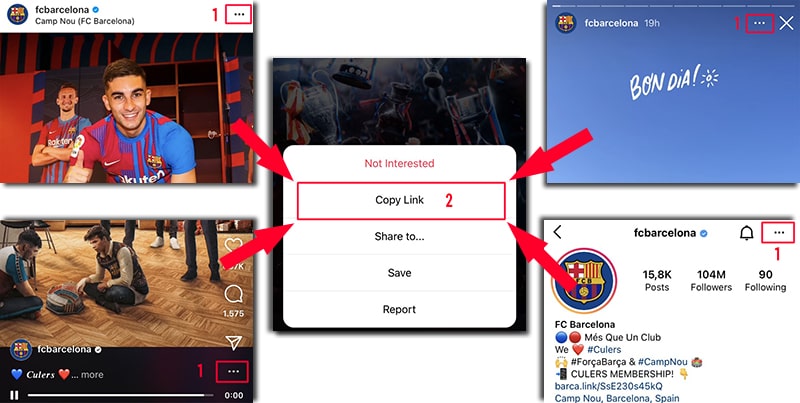
Open Instagram and navigate to the photo, video, or Reel you wish to save. Tap the three-dot icon (•••) at the top-right of the post and select Copy link from the options.
Step 2: Paste the link into SaveIG
Visit the SaveIG.to website using any modern web browser like Chrome, Safari, Firefox, or Edge.
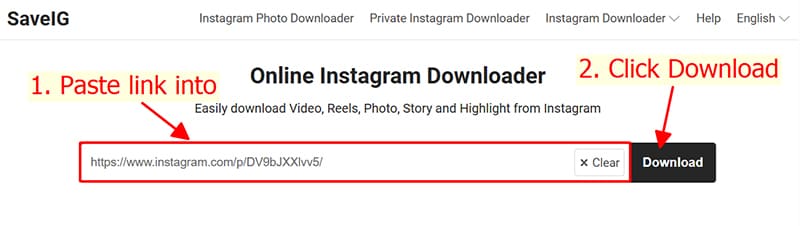
Click the Paste button to insert the link into the input field, then hit the Download button to begin the process.
Step 3: Save to your device
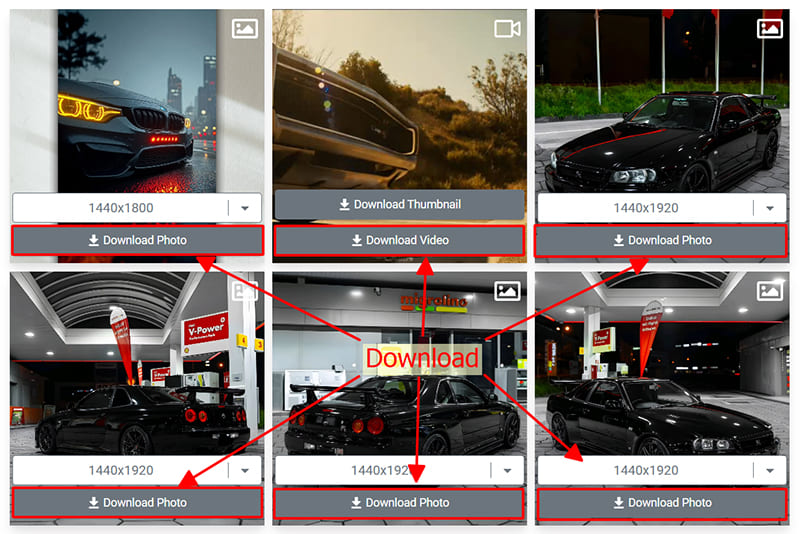
All available media will be displayed. Click Download Photo or Download Video under each item to save it in high resolution.
Note
If you encounter an error or wish to save content from a private profile, please use our Private Instagram Downloader at https://saveig.to/en/instagram-private-downloader and follow the specific steps provided.
During use, if you encounter an error, please contact us for support: contact@saveig.to